

NanoEditPRO is a fully-
NanoEditPRO provides the ultimate editing and sound development experience. The interface streamlines your workflow and allows you to view the complete details of any Program at a glance and to edit any parameter using your computer. It allows you to see how the factory Programs are put together or to freely experiment to see what you can create.
Please note!
The NanoEditPRO is not software instrument and it will produce no sounds unless connected with the Alesis® NanoSynth synthesizer.
Copyright © 2014 SOUNDTOWER INC.

Any questions or comments, please e-

NanoEditPRO -
for Windows (Windows 95 and newer)

NanoEditPRO is specifically designed for Alesis® NanoSynth family of synthesizers:
NanoSynth
NanoPiano
NanoBass

Some of the NanoEditPRO features:
- Full 32 bit Windows architecture
- Well organized Editing Windows
- Friendly and innovative editing of ALL NanoSynth parameters
- GUI unseen in any other editors!!!
- On-
Fly Librarians for Programs, Mix and Effects. - gives you a quick access to any NanoSynth sysex files available on your disks. Just click your mouse and you can audit and edit any Program, Mix or FX from any type of Sysex file (Bank, Library or even Dump all.) without writing it to NanoSynth and without dumping whole data - Display Last Sysex Command Send -
You can copy a sysex commands generated by editor into your favorite sequencer - Dump-
All Sysex Manager - Quick View, Edit, Dump and Organize NanoSynth Sysex Files - Copy and Paste of single Drum Tone Sounds
- Drum Gang Editing windows -
Editing Drums in 3 different ways - Controllers ABCD window with automatic NanoSynth C. ABCD settings
Auditioning Tools:
- Continuous Controllers ToolsPC Flight Joystick and Mouse-
Joystick - very cool!!! - Controllers ABCD Tool Window with automatic assignment
- Virtual Piano with quick channel selection
- Play notes by computer keyboard keys
Program and Mix Modes:
- Fast editing of all NanoSynth banks including 16 Card Banks
- Sound Editing with copy, paste of single sounds
- Single Sound librarian
- OFF LINE Mix editing.
- Copy and paste of Program Group Parameters
- Excellent Graphical Interface with Drag Envelopes
- Automatic Keyboard Zone editing by keyboard
- Save and Load of Programs (single or extracted from banks)
- Effect module with "quick browse-
apply" librarian - Program librarian and Program Bank Manager
- Global, Modulation, Keyboard and Drum Mode Editing etc.
- Copy and Paste of Single Channel Parameters
- Quick and easy editing of Channel Parameters
- Automatic Keyboard Zone editing by Keyboard in Mix
- Fly-
By help and tool tips
Miscellaneous:
- Printing of NanoSynth Banks
- Patchname Script Generator for Cubase VST 5.xx
- Fast "All" *.syx file loading with options
- Selective making *.syx files for SoundBridge® using DUMP ALL SYSEX MANAGER
- On line Help and Tips…
And many more other useful features...

MAIN EDITING WINDOW
SOUND EDIT
NanoEditPRO Editing Windows
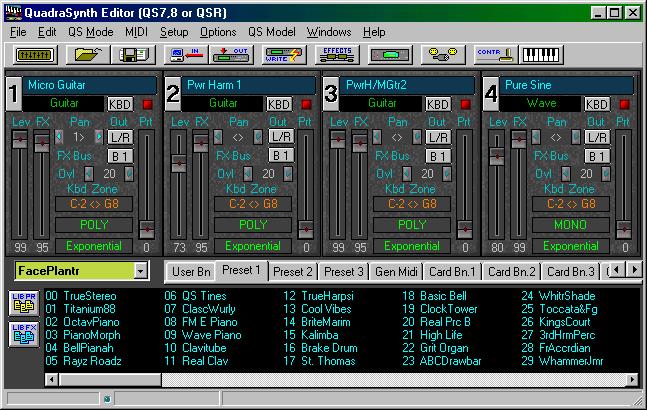

ENVELOPES
QS EFFECTS


DRUM EDITOR




IMPORTANT! It is recommended to use serial cable connection as a MIDI interface. The MIDI OUT port on NanoSynth acts also as MIDI THRU. Because of this feature all commands sent to NanoSynth are sent back to the Editor creating a MIDI loop.
Please check the Serial Cable Pinout here.

The NanoEditPro Sound Editor for Alesis NanoSynth has reached the legacy state.
This means it is available free of charge but also with no support.
For download and registration click on this button
